Blog · gyms and fitness studios
Gym Chatbot Setup: Step-by-Step for Your Studio
Learn how to set up a Repli AI chatbot for your gym or fitness studio, from adding your timetable to answering customer questions.
By the Repli team · · 5 min read
The short answer
A gym owner sets up Repli, an AI chatbot for business websites, by adding their website, membership plans, and class schedules. It learns from these files to answer common questions from visitors directly on your website.
Key points
- Repli learns from your gym's specific content, like timetables and membership details, to give accurate answers.
- You can set the chatbot's tone and rules to match your gym's brand and collect lead forms from visitors.
- The setup involves giving Repli your information, adding it to your website, and then reviewing its performance.
- Repli can handle questions about class timings, membership options, and policies in multiple languages.
Why a chatbot matters for your gym
Running a gym or fitness studio means you often answer the same questions. Visitors want to know about class timings, membership fees, or if there are special offers. Answering these repeatedly takes time away from your staff. This can make it harder for your team to focus on helping members in person or running classes.
A chatbot on your website can handle these common questions instantly. It works 24/7, even when your gym is closed. This means potential new members can get answers right away, which might encourage them to visit your gym or sign up. It also frees up your team to provide a better experience for existing members. Repli is an AI chatbot for business websites that answers from the business's own pages and files.
Setting up your gym's Repli chatbot
Setting up Repli for your gym is a straightforward process. You will guide it to learn about your services and then add it to your website.
Step 1: Sign up for Repli and choose your business type.
Select "Gym" or "Fitness Studio" to tailor the initial settings.
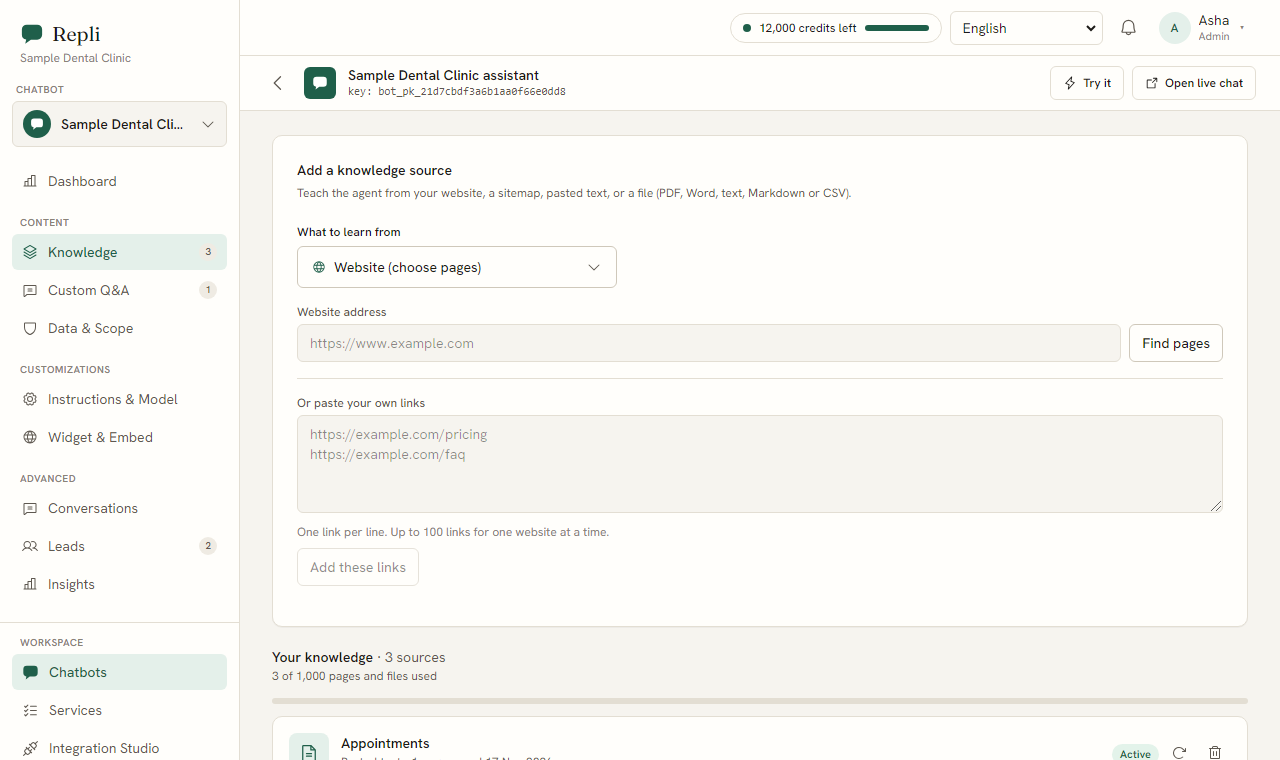
Step 2: Under Knowledge, give Repli your website address or sitemap.
This lets it learn about your gym from your existing web pages.
Step 3: Upload files such as your membership plan sheet, class timetable, pause and refund policy, or brochures.
These files are crucial for Repli to answer specific questions.
Step 4: Add saved answers for common questions under Custom Q&A.
For example, you might add a custom answer for "What are your operating hours?".
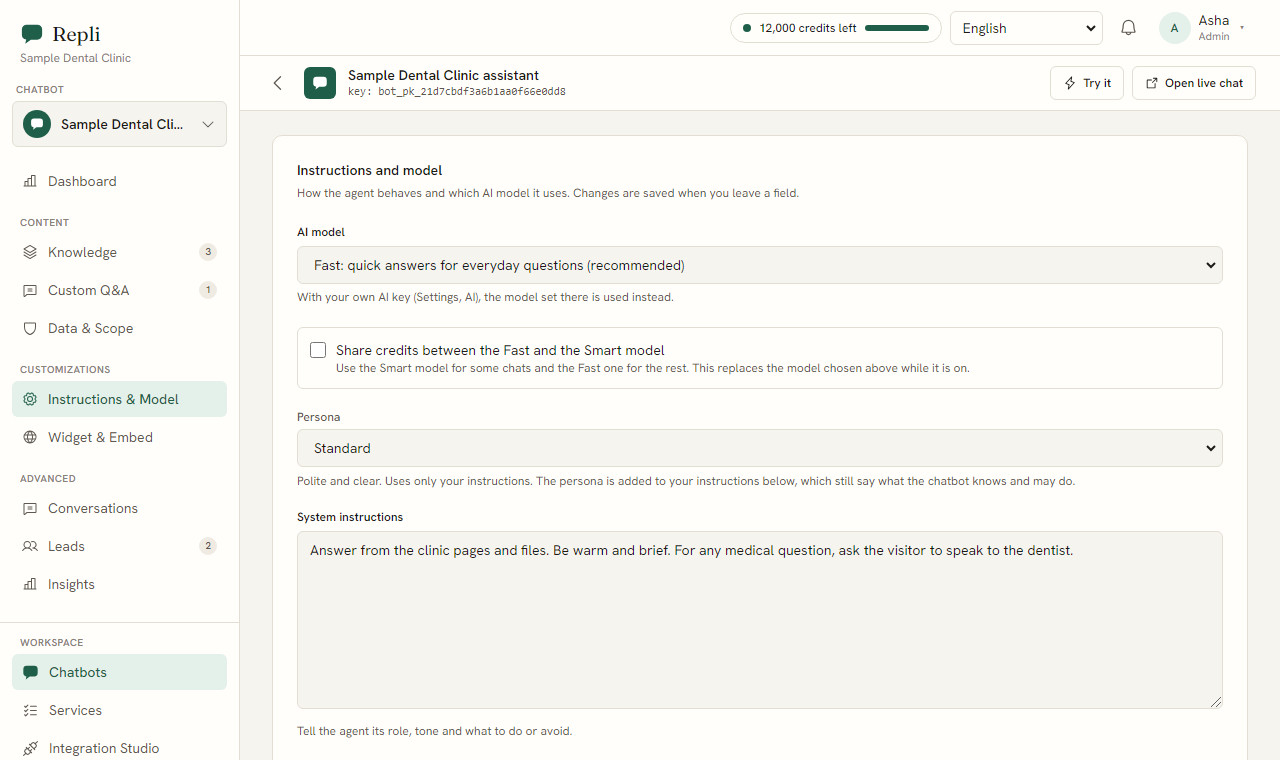
Step 5: Under Instructions and Model, set the tone and rules for your chatbot.
You might want it to be encouraging and energetic, like your gym's trainers.
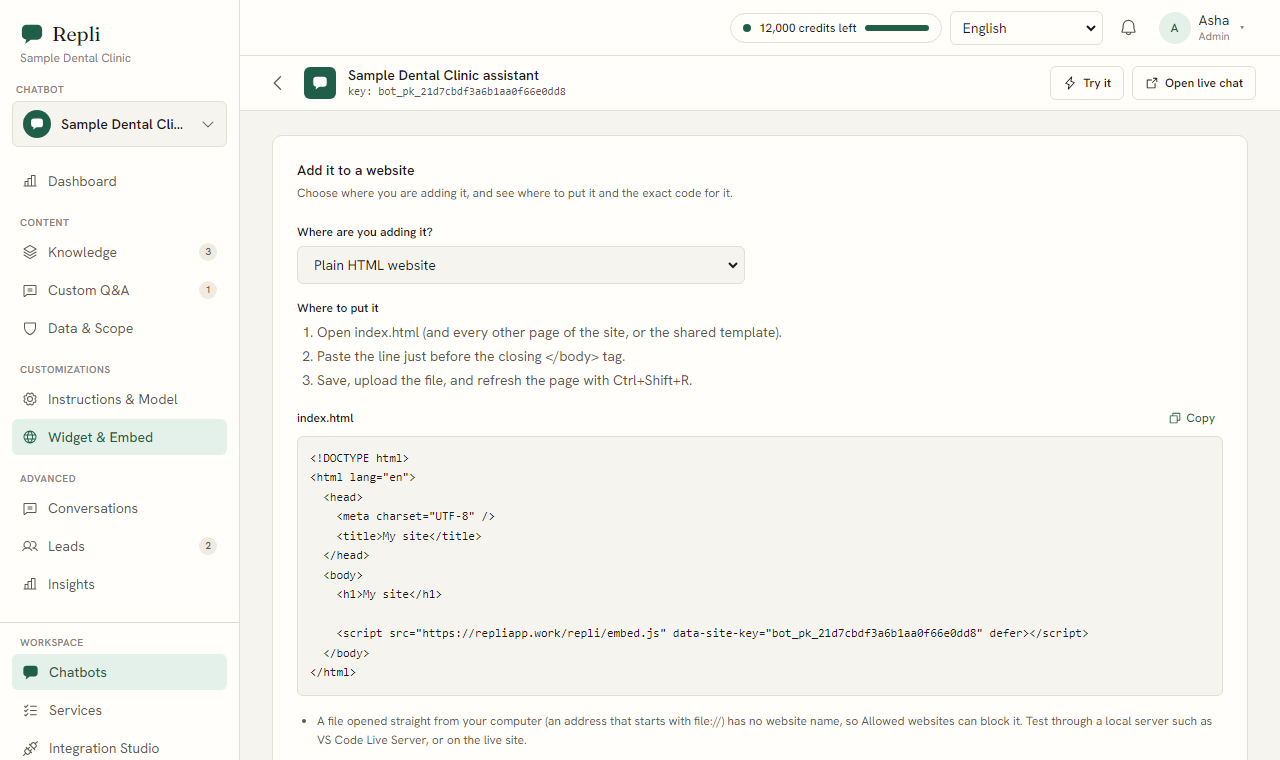
Step 6: Under Widget and Embed, copy one line of code (a script tag).
Step 7: Paste this code into your website's code, usually before the closing body tag.
The chat will then appear in the corner of your website in your chosen colours.
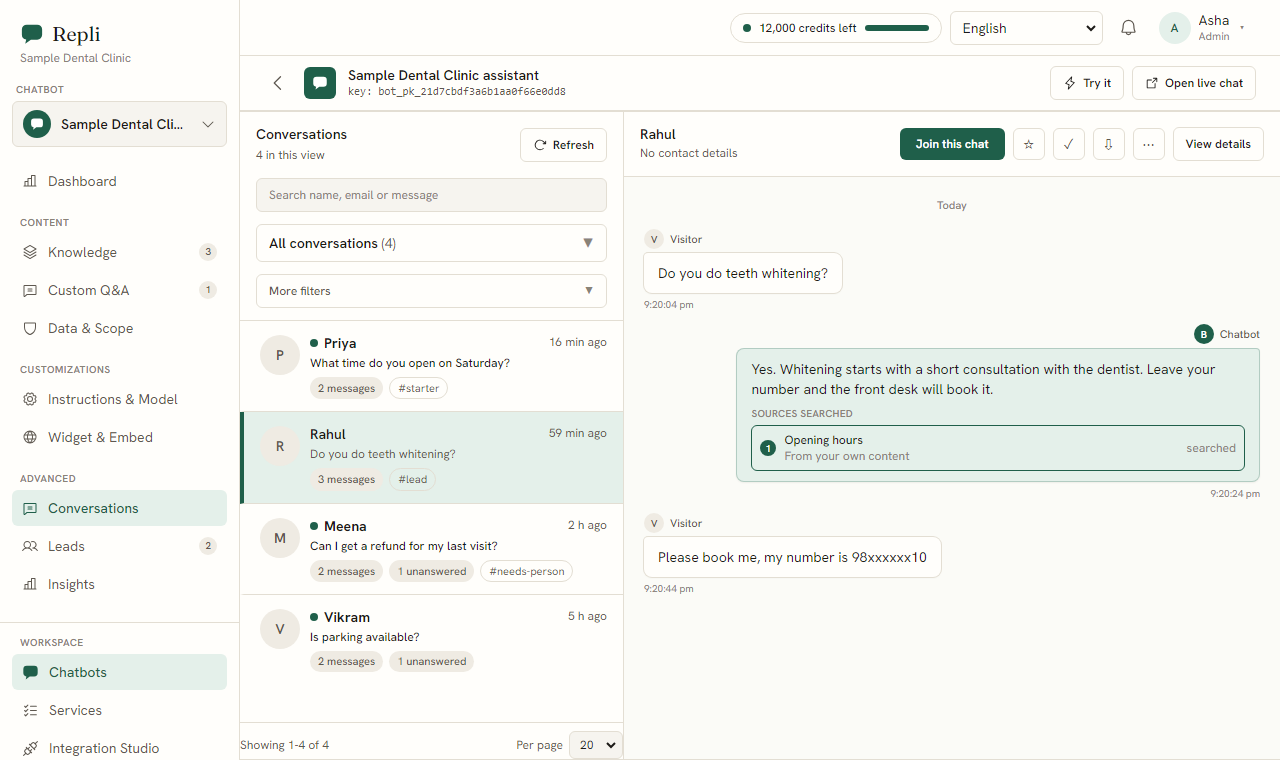
Step 8: Under Conversations, you can read every chat your Repli chatbot has with visitors.
This helps you see what questions are being asked.
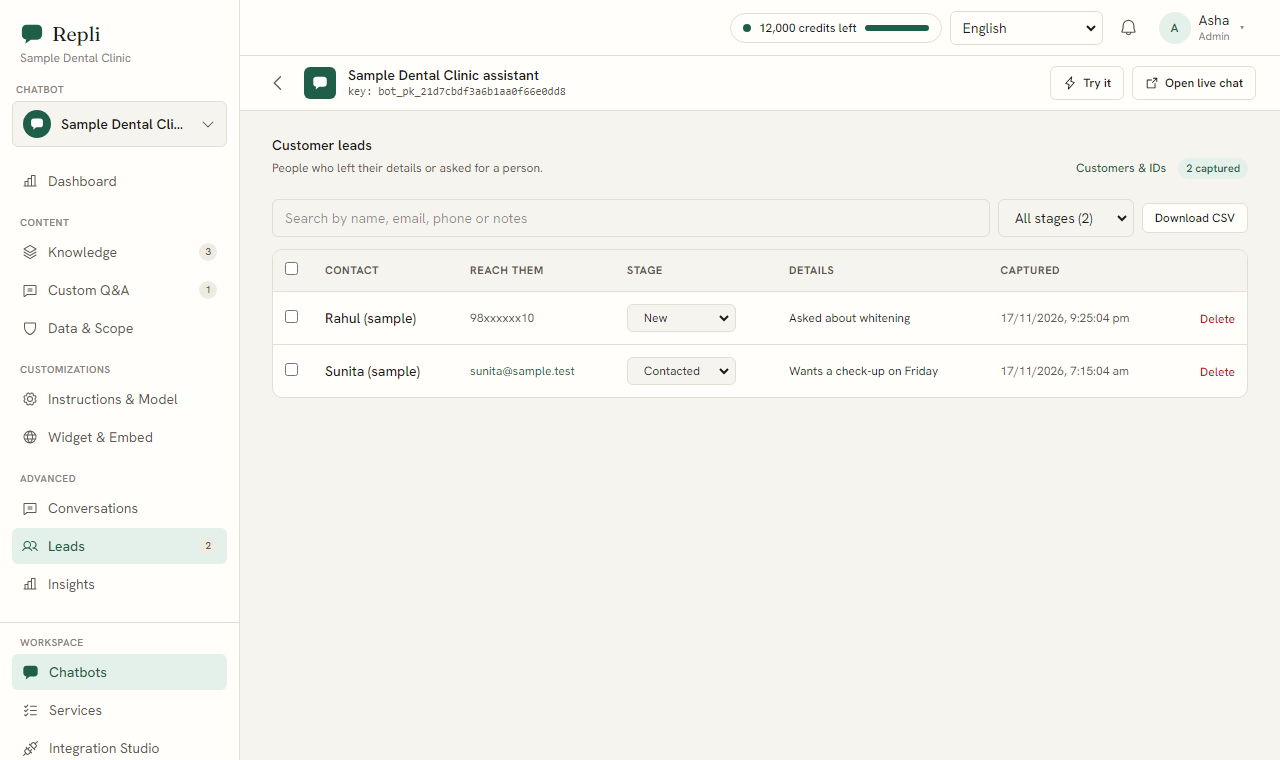
Step 9: Check the Leads section for any lead forms collected by the chatbot.
This is where you'll find contact details for potential members.
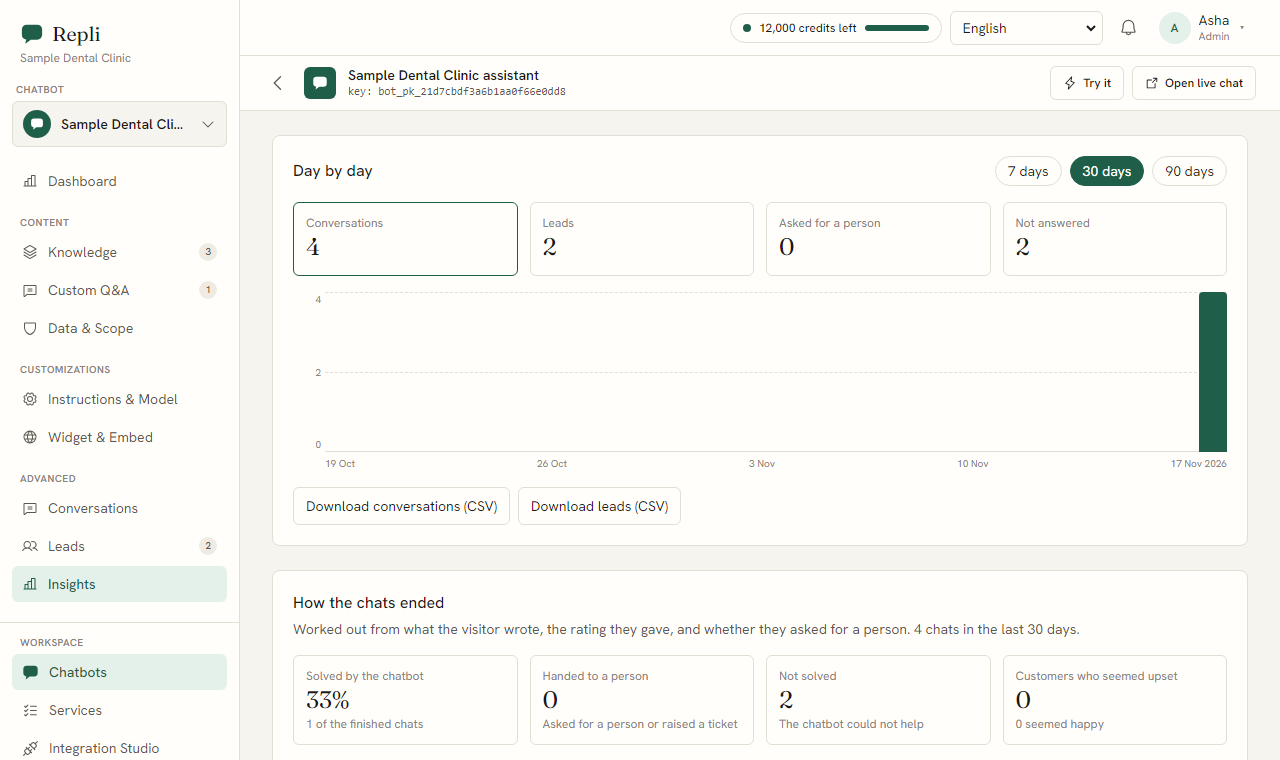
Step 10: Under Insights, review questions the chatbot could not answer.
With one click, you can teach it the right answer for future interactions.
Tip: Make sure your uploaded files are clear and up-to-date. The better the information you provide, the better Repli will answer.
How your gym's chatbot answers common questions
Once set up, Repli uses the information you provided to help your visitors. Here are some examples of real questions and how your chatbot would respond:
- Visitor asks: "What is the monthly fee for unlimited classes?"
Repli answers with the specific monthly fee from your uploaded membership plan sheet. It might also mention what is included in that plan, such as access to all facilities.
- Visitor asks: "Is there a ladies-only batch for Zumba?"
Repli checks your class timetable and confirms if a ladies-only Zumba batch exists, stating the batch timings from your schedule file if it does.
- Visitor asks: "Can I pause my membership for a month?"
Repli refers to your pause and refund policy document. It explains the process for pausing a membership, including any conditions or required notice periods.
- Visitor asks: "Do you have personal training sessions?"
Repli confirms the availability of personal training from your services information and might offer to connect them with a team member or a booking link.
- Visitor asks: "What are your gym's opening hours on weekends?"
Repli provides the exact opening and closing times for Saturday and Sunday from your custom Q&A or website content.
Note: Repli can offer a Calendly link for bookings if you set this up. This is useful for booking personal training consultations or gym tours.
Common questions about gym chatbots
- Question? Can the chatbot collect contact details?
Answer. Yes, the chatbot can collect a lead form (name, email, phone) from visitors interested in your gym. These leads appear under the Leads section in your Repli account.
- Question? What happens if someone asks for a person?
Answer. If a visitor asks for a person, your team is alerted and can join the same chat. The chatbot stays quiet while your team talks directly with the visitor.
- Question? Can the chatbot answer in different languages?
Answer. Yes, Repli replies in the language the visitor writes in, including Hindi and Telugu, as far as the AI model supports it.
- Question? How do I make sure the chatbot gives correct information?
Answer. You ensure accuracy by providing Repli with your latest and most accurate information through your website, uploaded files, and custom Q&A. Regularly check the Insights section to teach it answers for previously unknown questions.
- Question? Can I connect the chatbot to my other software?
Answer. Yes, the Integration Studio connects Google Drive, Notion, and Shopify as places for Repli to learn from. It can also integrate with Zendesk or Freshdesk for tickets.
What to do next
Now that you understand how to set up Repli for your gym, the best way to see its value is to try it yourself. You can see how Repli works for gyms and fitness studios or use the Repli preview to train a chatbot on your own website to see it in action.
See a chatbot trained on your own website
Paste your address and try it, with no sign-up.