Blog · salons
Salon Chatbot Setup: Step-by-Step for Repli
Learn how to set up a Repli AI chatbot for your salon website, from initial setup to answering customer questions.
By the Repli team · · 5 min read
The short answer
Setting up a Repli AI chatbot for your salon website involves adding your service details and policies, then embedding it on your site. Repli is an AI chatbot for business websites that answers from the business's own pages and files. It will handle common customer questions about services and bookings for you.
Key points
- You will feed Repli your salon's service menu, prices, and policies.
- Repli can collect lead forms and alert your team when a visitor asks for a person.
- You can review all conversations and teach Repli answers to new questions.
- The chatbot replies in the language your visitor writes in, including Hindi and Telugu.
Why does a salon need a chatbot?
Your salon's phone rings often with questions about services, prices, and availability. This takes your team away from serving clients. A chatbot on your website can answer many of these common questions instantly. This frees up your staff and ensures potential clients get quick responses, even outside business hours. It can also help clients book appointments by offering a link to your booking system. This means fewer missed opportunities and a smoother experience for your customers.
How to set up Repli for your salon
Setting up Repli for your salon is a straightforward process. You will guide it to learn about your services and how you want it to interact with visitors.
Step 1: Sign up and choose your business type.
Select "Salon" when you first create your account. This helps Repli understand the kind of information it will be handling.
Step 2: Add your salon's knowledge base.
Go to the Knowledge section. Here, you can give Repli your website address or sitemap. You can also upload files like your service menu, price list, cancellation policy, or bridal package details. You can also add notes directly.
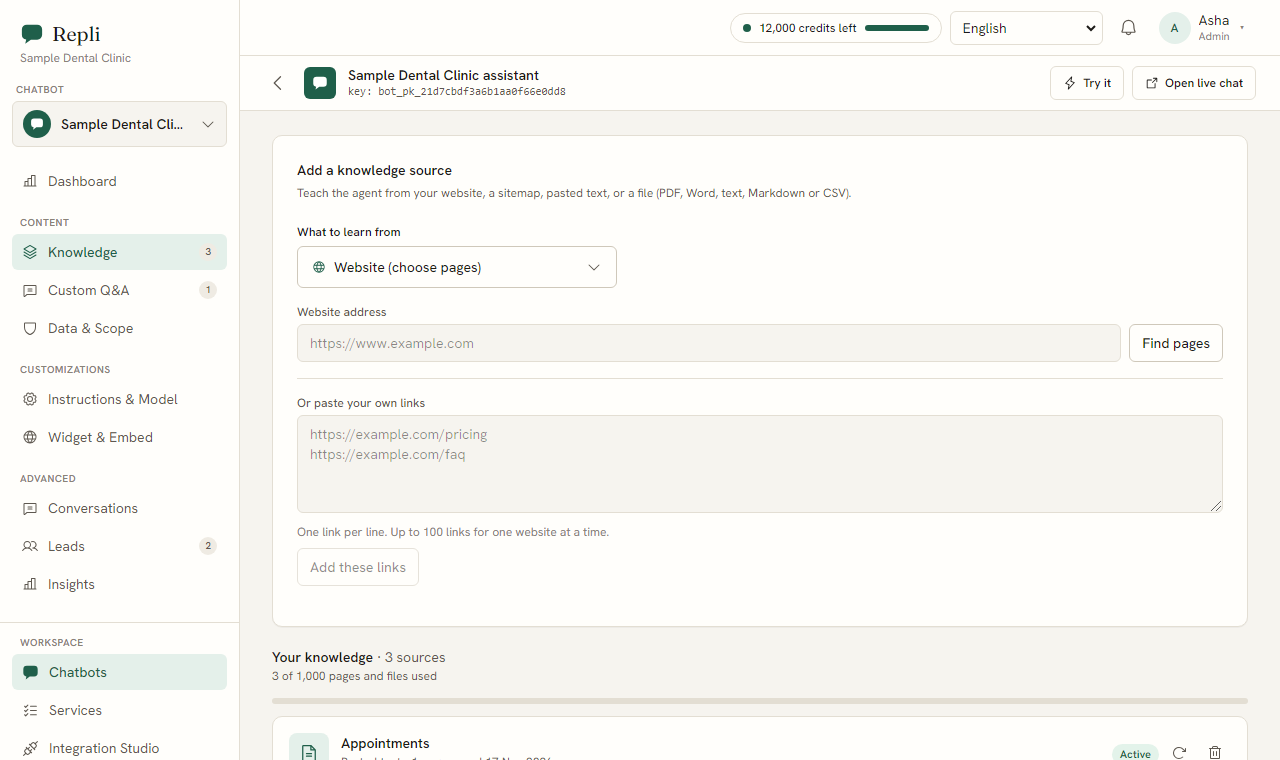
Note: The more information you give Repli about your salon, the better it will be able to answer customer questions.
Step 3: Add saved answers for common questions.
Under Custom Q&A, you can create specific answers for questions you know your clients ask often. For example, "What are your opening hours?" or "Do you offer gift vouchers?"
Step 4: Set the tone and rules.
In the Instructions and Model section, you tell Repli how to behave. You can set a friendly tone, for example, and tell it to always refer to your price list for specific costs.
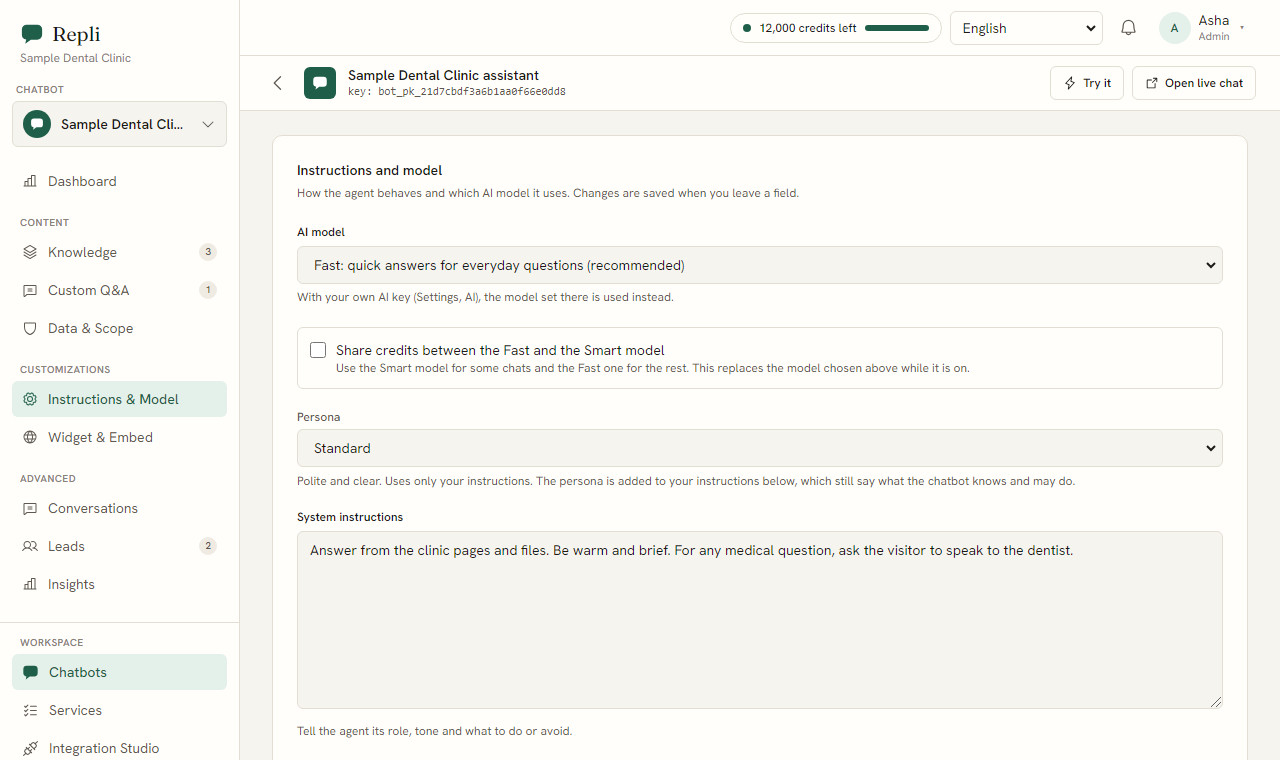
Step 5: Embed the chatbot on your website.
Go to Widget and Embed. You will copy one line of code (a script tag) and paste it into your website's code. The chat widget will then appear in the corner of your website in your chosen colours.
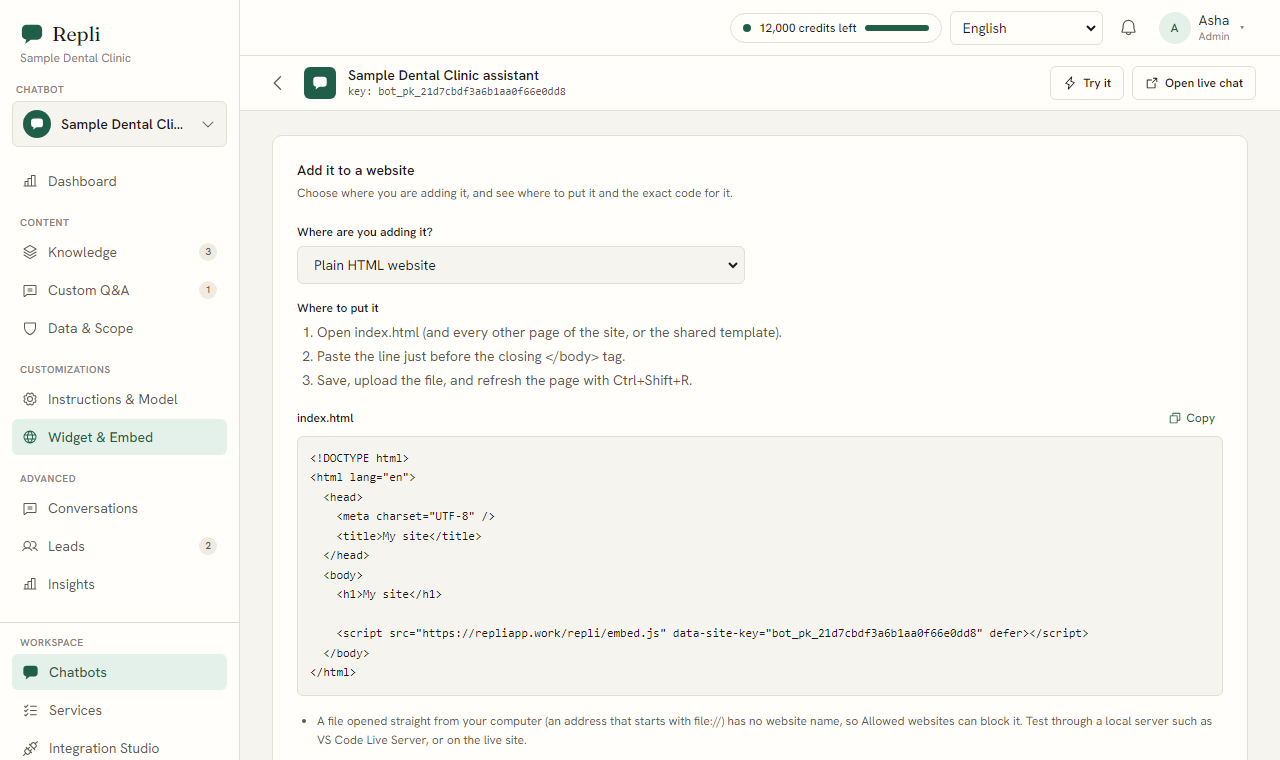
Tip: Most website builders have a clear place to add custom code. If you are unsure, your website developer can help.
Step 6: Set up lead collection.
Under Leads, you can configure the chatbot to collect a lead form including name, email, and phone number. This is useful for capturing details of interested visitors.
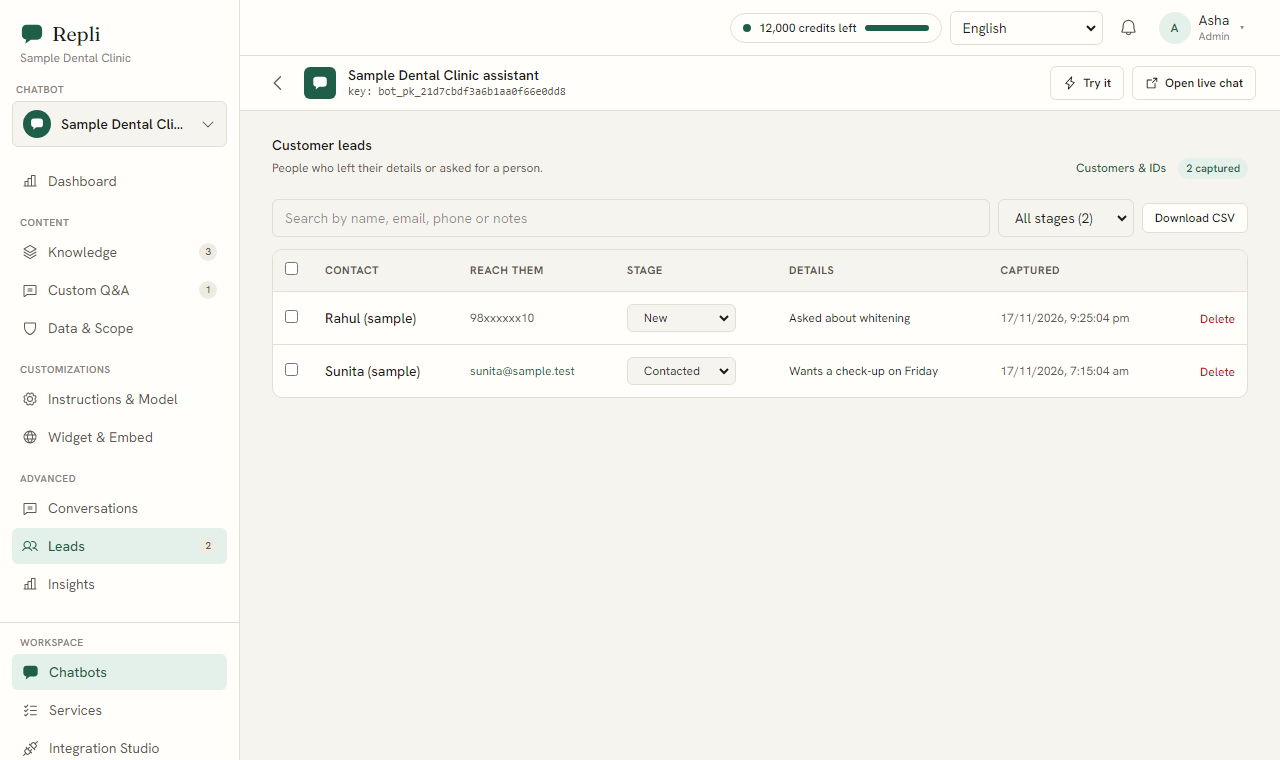
Step 7: Connect your booking system.
If you use Calendly for bookings, you can offer a Calendly link through Repli. This helps visitors book appointments directly.
Step 8: Monitor and improve.
Regularly check the Conversations section to see how Repli is interacting with your clients.
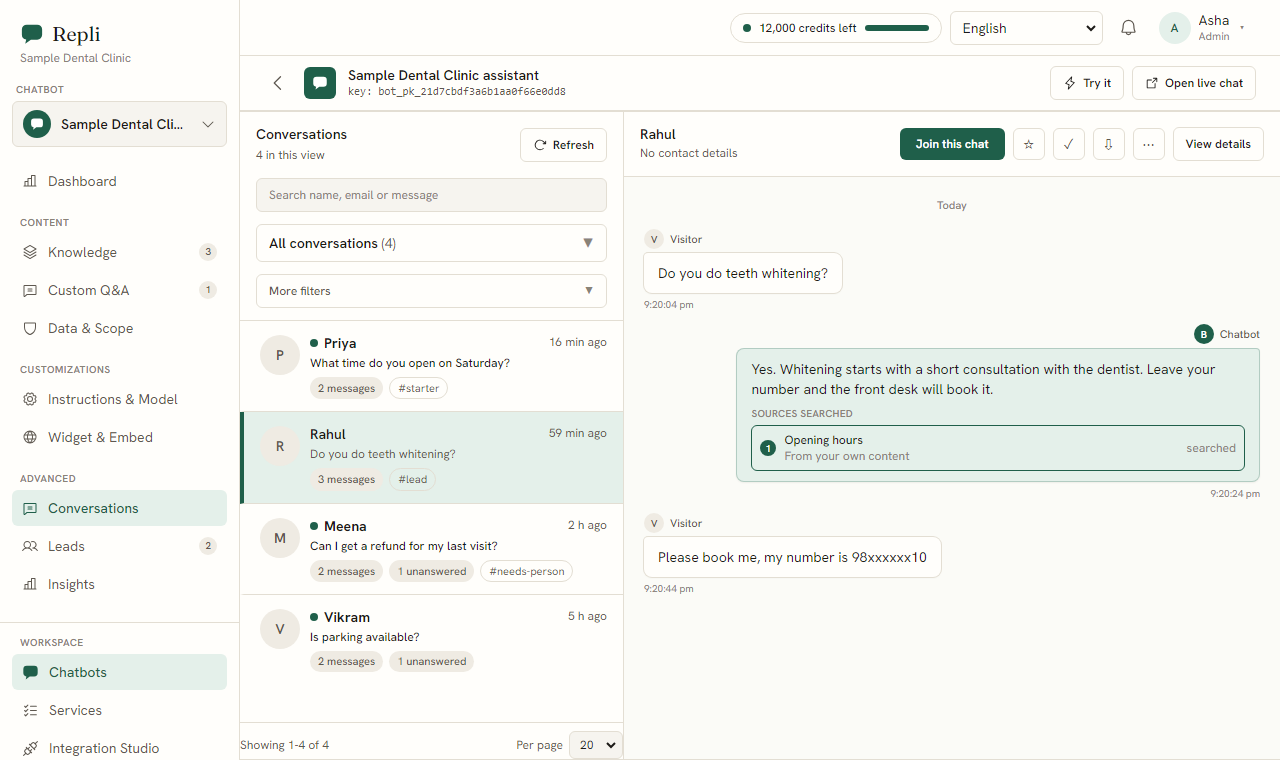
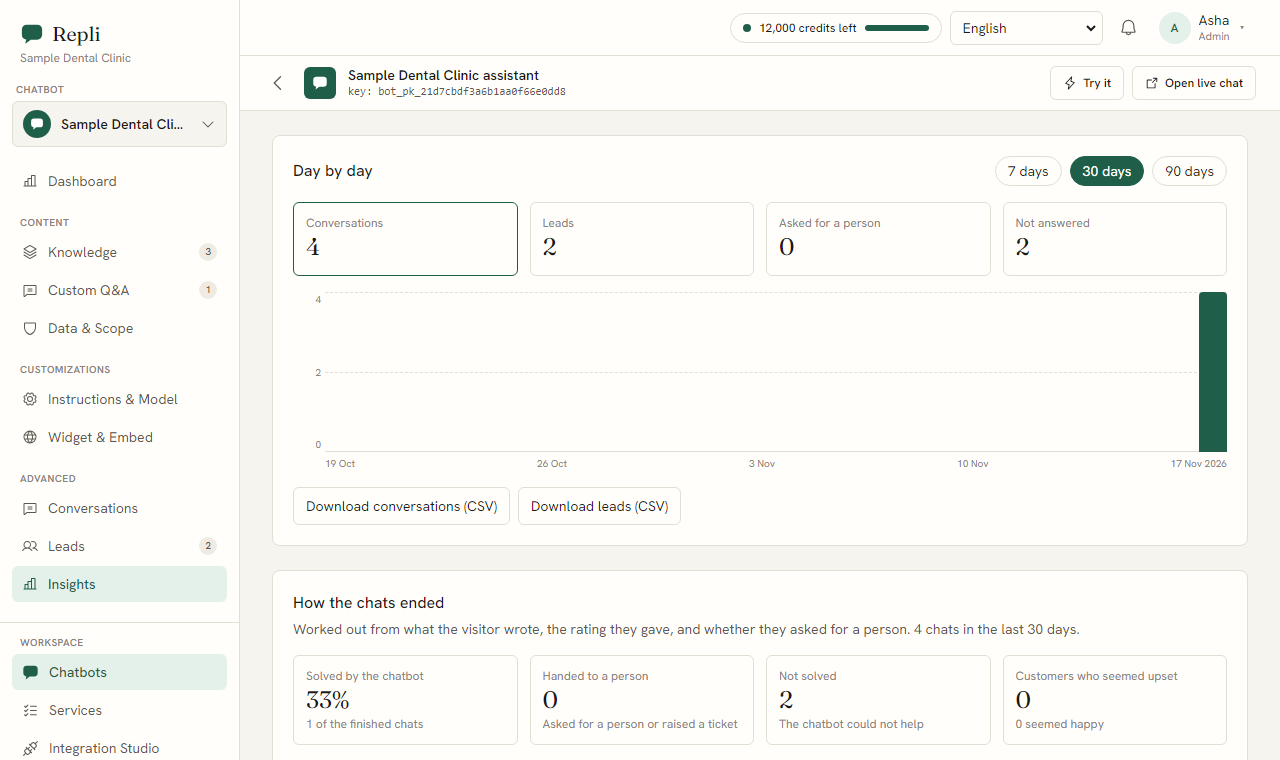
Under Insights, you can see questions Repli could not answer. With one click, you can teach it the correct response, making it smarter over time.
What questions will your salon's chatbot answer?
Think about the questions your clients ask every day. Repli can answer these, drawing from the information you provide.
- "How much is a haircut and colour?"
The chatbot will reply with the relevant prices from your uploaded service and price list. For example, "A women's haircut starts from [price] and a full head colour starts from [price]. You can find our full price list [link to your price list on your website]."
- "Is a slot free on Saturday for a manicure?"
The chatbot can offer your Calendly link for bookings, saying something like, "To check availability for a manicure on Saturday and book your slot, please use our online booking system [Calendly link]."
- "Do you do bridal makeup?"
The chatbot will answer based on your bridal package notes or brochure. For example, "Yes, we offer bridal makeup services. Our bridal package includes [details from your file]. Would you like me to share more details or connect you with a stylist?"
- "What is your cancellation policy?"
The chatbot will explain your cancellation policy directly from your uploaded policy document. For example, "Our cancellation policy requires at least [number] hours' notice for any changes or cancellations. Please refer to our full policy [link to policy page] for more details."
- "What products do you use for hair treatments?"
The chatbot can list the product lines you use, if you have provided that information. For example, "We use [brand name] and [another brand name] professional products for our hair treatments. These are chosen for [reason from your notes]."
Common questions
- Question? Can the chatbot collect customer details?
Answer. Yes, the chatbot can collect a lead form including the visitor's name, email, and phone number. This information is then available for you to follow up.
- Question? What happens if a customer wants to speak to a person?
Answer. Visitors can ask to speak to a person. Your team will be alerted and can join the same chat. The chatbot will then stay quiet while your team talks with the customer.
- Question? Can the chatbot reply in different languages?
Answer. Yes, the chatbot replies in the language the visitor writes in, as far as the AI model supports it. This includes languages like Hindi and Telugu.
- Question? Can I see what the chatbot has said to customers?
Answer. Yes, you can read every chat under the Conversations section. This allows you to monitor interactions and ensure the chatbot is performing well.
- Question? How do I teach the chatbot new answers?
Answer. Under Insights, you can see questions the chatbot could not answer. You can then teach it the right answer with one click, improving its knowledge for future interactions.
What to do next
Ready to see how Repli can help your salon? You can try Repli on your own website to see it in action. Explore Repli for salons to learn more about specific features.
See a chatbot trained on your own website
Paste your address and try it, with no sign-up.